
How do you tell every client that check-ins move to Sunday next week? Most fitness coaches open WhatsApp and start pasting. It works, but your news lands in a chat app, away from the plan your client trains from.
A broadcast is one message a fitness coach sends to many clients at once. Each client gets it privately: nobody sees who else received it, and it never turns into a group chat.
| Client broadcasts at a glance | |
|---|---|
| Good for | Holidays, a new check-in day, a new block, a reminder for everyone |
| Who gets it | All your current clients on the app, or only the ones you tick |
| What clients can do | React with one tap; there’s no reply thread |
| What you see | Who has seen it, who hasn’t, and how each client reacted |
This guide covers:
- When fitness coaches should send a broadcast
- What WhatsApp doesn’t do for a coaching business
- How personal trainers write a broadcast clients act on
- How to broadcast to clients on Assistant Coach platform
When fitness coaches should send a broadcast
Send one when the news is the same for everyone, or for a group: you’re away for a week, replies will be slower over a holiday, a new training block starts Monday, progress photos are due this Sunday.
Keep coaching feedback for one-to-one replies, next to the workout or meal it’s about. And send broadcasts sparingly: a client who gets one every few days learns to skip them.
What WhatsApp doesn’t do for a coaching business
WhatsApp is great for quick chats. The gaps show up when it runs your announcements:
| WhatsApp broadcast list | WhatsApp group | Broadcast in your client app | |
|---|---|---|---|
| Who’s included | The contacts you add to the list by hand | Whoever you’ve added to the group | Your current clients on the app, kept up to date for you |
| A message for just a few clients | Build another list | Start another group | Tick them for this one message |
| Where it lands | Among their friends and family chats | In a group chat everyone can reply to | In the app they train from, next to their plan |
| Sending from your laptop | Not on desktop or web | Yes | Yes |
No lists to keep in sync. Your client list changes every month. A broadcast to all your clients on the app includes this week’s new client and leaves out the one who paused, without you editing a list.
Also, a WhatsApp broadcast list only reaches clients who have saved your number. Anyone who didn’t misses the news.
How personal trainers write a broadcast clients act on
- Put the change and the date in the first line, not in line four.
- Ask for one thing. Two actions usually means two messages.
- Add the link they’ll need, such as a booking page or a form. Clients tap it straight from the message.
An example:
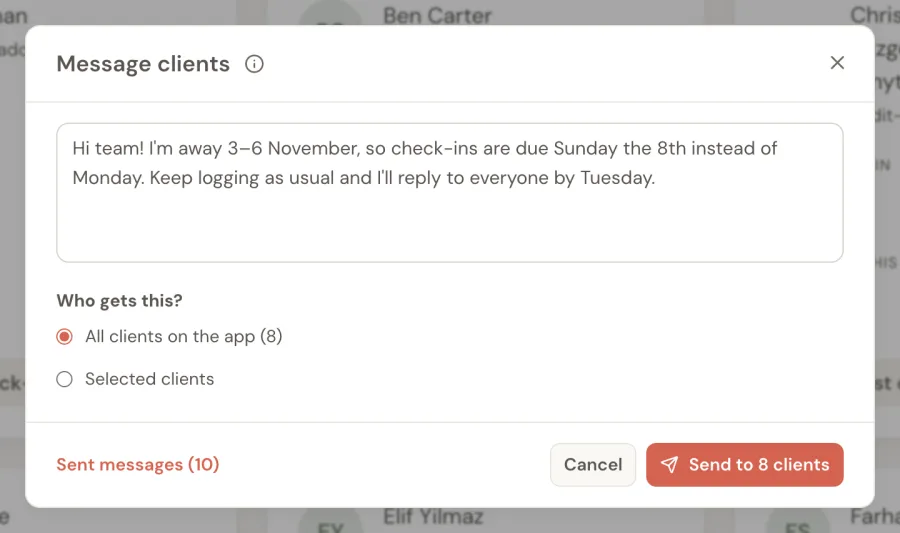
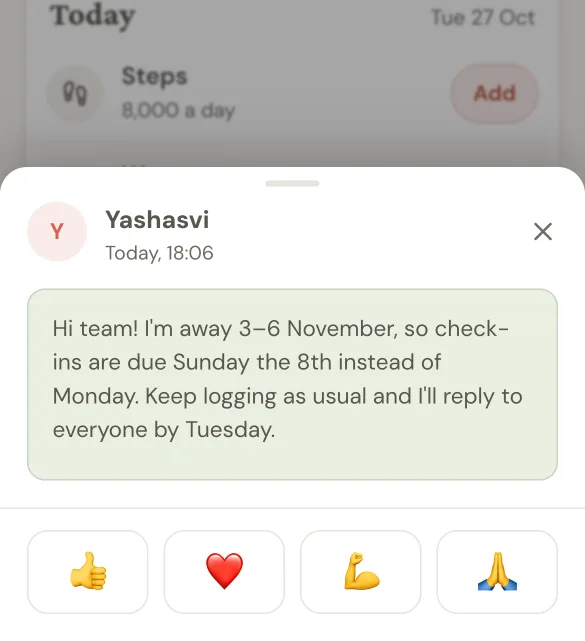
Hi team! I’m away 3–6 November, so check-ins are due Sunday the 8th instead of Monday. Keep logging as usual and I’ll reply to everyone by Tuesday.
How to broadcast to clients on Assistant Coach platform
On Assistant Coach platform, broadcasts sit on your Clients page, next to the check-ins, workout logger, meal and workout plans and notes you already run each client from:
- Write it once. Click Message clients, then keep All clients on the app or tick the clients it’s for.
- Confirm. The button shows how many clients will get it.
- Clients see it next time they open their app, with your name and four one-tap reactions: 👍 ❤️ 💪 🙏. It never interrupts a workout.
- See who’s read it. Sent messages shows “Seen by 33 of 41 · 21 reacted”, and lists who hasn’t seen it yet: your shortlist for a personal nudge.
The broadcast guide has the details, and the client app tour shows where it appears.
Frequently Asked Questions
How can a personal trainer message all their clients at once?
Send a broadcast: one message that reaches every client privately, with no group chat. A WhatsApp broadcast list does it from your phone; a coaching app with broadcasts does it from your client list.
Is there a better way to send announcements to coaching clients than WhatsApp?
For coaching news, a broadcast in your client app keeps the message next to the client’s plan and sends to all your clients, or a few you tick, without building lists. WhatsApp still suits quick chats.
Can clients reply to a broadcast message?
On Assistant Coach platform, clients react with one tap instead of replying, so a message to 40 clients never becomes 40 threads. Anyone who wants to talk can still message you as usual.
How do I know which clients read my announcement?
Use a tool that lists who hasn’t seen it. That list tells you who to nudge personally when the message matters.
References
- WhatsApp Help Center: How to use broadcast lists
 Why Fitness Coaching on WhatsApp Hits the 20-Client Wall
 The Client App That Keeps Fitness Coaching Clients