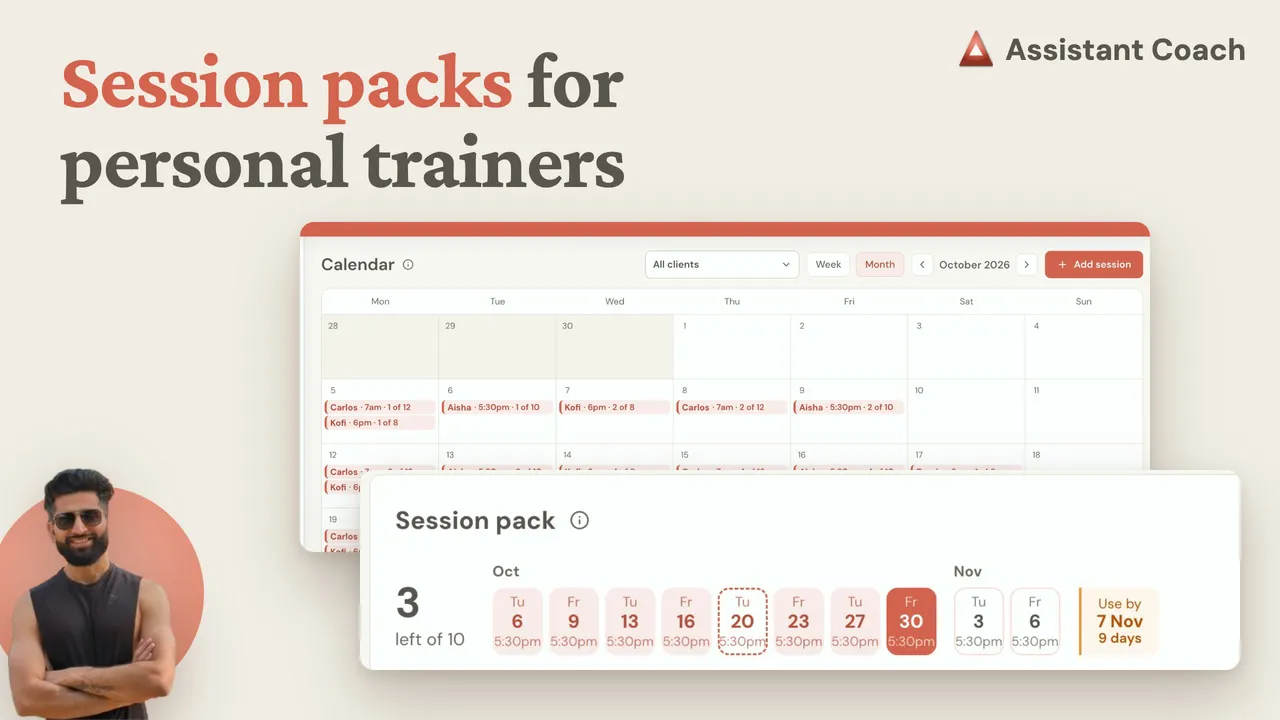
The spreadsheet says Sarah has four sessions left.
She has three. She cancelled late on Thursday, two of those are booked, and the package runs out in nine days. Nobody notices until she asks, and by then there’s no next block agreed.
Tracking personal training sessions means knowing, for every client, how many sessions they paid for, how many they’ve used, what’s booked next and when the package expires.
| Session tracking at a glance | |
|---|---|
| The count | Paid for, used, booked and left, per client |
| What uses a session | A session that happened, a late cancel or a no-show |
| Where it runs | The calendar on your laptop, your phone in the gym |
| What your client sees | Their next sessions and how many are left |
Here’s what this guide covers:
- Why a personal trainer’s spreadsheet loses count
- A scheduling calendar that counts sessions for you
- Log personal training sessions on your phone in the gym
- How to set up session packages for fitness coaching clients
Rather watch? It’s under four minutes:
Why a personal trainer’s spreadsheet loses count
A client tracker spreadsheet holds what you type. Your diary holds what happened. Every moved booking and late cancel has to be copied across by hand, and the first one you miss puts the count out.
Two habits fix most of it, in any tool:
- Count a session once it has happened, not when it’s booked. Counting at booking makes a full diary look like an empty package.
- Agree one cancellation rule up front. Say what a late cancel or no-show costs before the first session.
A scheduling calendar that counts sessions for you
The fix is to keep the bookings and the count in one place. On Assistant Coach platform, a client’s session package sits next to the check-ins, workout plans and notes you already keep for them, and their regular times are booked in your calendar every week.
- Sessions count themselves. Once a session’s time is over, it uses one from the package. You only mark the exceptions: a late cancel or no-show still uses one, and a session cancelled in time goes back.
- Your clients list shows who’s running low: sessions left and the next booking, for every client.
- The package card counts down the days left in the two weeks before its use-by date, your cue to talk about the next block. Start a new pack suggests the same size and the same weekly times.
Your client sees the same count in their client app, so you renew from numbers you both agree on.
Log personal training sessions on your phone in the gym
You don’t need a laptop on the gym floor. On your phone, the calendar is a list of your sessions:
- Book or move a session. Tap Add session, or open one and choose Move when a client asks to switch.
- Log their workout set by set. Open today’s session, tap Log workout, and the workout from their plan opens in the same workout logger your clients use. When you finish, the session is counted in the package.
- Keep private session notes, like “left knee sore on lunges”, on the session or on an exercise while you log. Only you see them.
Back on your laptop, View workout shows every set and weight, and your client’s notes filter to Sessions, each linking to its session. You walk into the next one knowing what happened last time.
How to set up session packages for fitness coaching clients
- Add the package. On the client’s page, choose Add a session pack: how many sessions, an optional use-by date, and the days and times they train.
- The calendar books it. Those times are booked every week until the package is full. It shows every session, in person or online.
- Move or cancel when life happens. Your client can get an email with the new time.
- Book clients without a package one session at a time, for a trial, a consultation or pay-as-you-go.
Packages keep the count; you take payment the way you do today. The session packs guide has the rest.
Frequently Asked Questions
How do personal trainers track client sessions?
Track sessions paid for, used, booked and the use-by date for each client, counting a session once it has happened.
What should a personal training session tracker do?
Book sessions and keep the count in one place, handle late cancels, warn you before a package runs out, and work on your phone in the gym.
Does a late cancellation use a session from the package?
Your policy decides. On Assistant Coach platform, a late cancel or no-show uses one, and a session cancelled in time goes back.
Can I log a client’s workout on my phone during a session?
Yes. Open today’s session on your phone, tap Log workout and record each set as they lift, with private notes only you see.
References
- Assistant Coach Help Center. (2026). Session packs and your calendar. help.assistantcoach.fit
- Assistant Coach. (2026). How to Track Personal Training Session Packs and Bookings. YouTube
- Assistant Coach. (2026). How to Log Personal Training Sessions: Notes and Workouts. YouTube
 From Google Sheets to Coaching Software: A Guide for Personal Trainers & Fitness Coaches
 How to Get Fitness Coaching Clients to Log Their Workouts