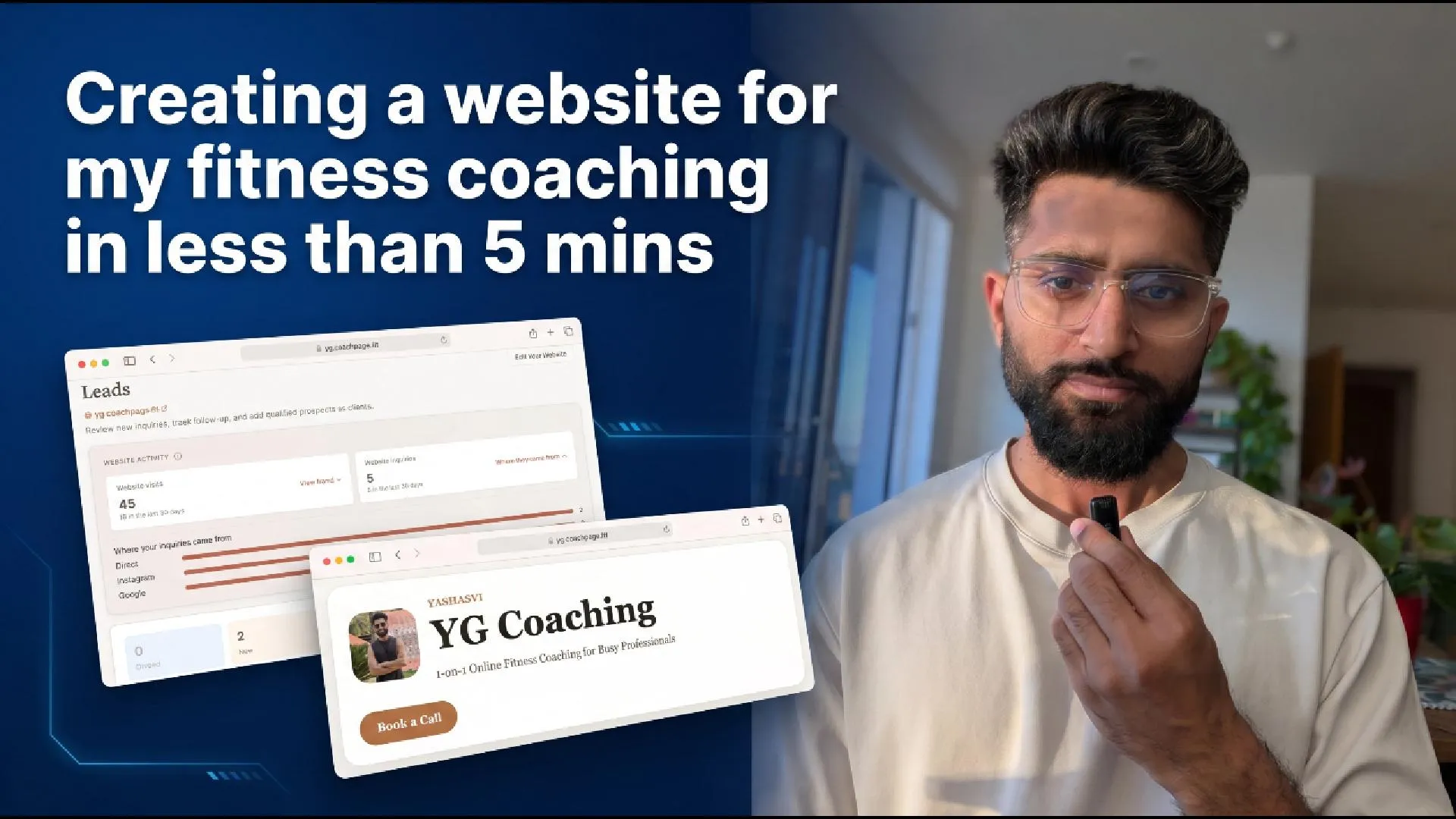
You coach online. Maybe you call it personal training, maybe online coaching. Either way, your inquiries arrive in five different places: Instagram DMs, WhatsApp, email, a comment here, a referral text there. You tell yourself you’ll get back to them, and then a good lead quietly slips through the cracks.
A simple coaching website fixes most of that, and building one is faster than you’d think. I put mine together in under five minutes: one link I can share anywhere, where prospects learn about me and send an inquiry that lands in one organised place. Here’s exactly how, so you can do the same.
A fitness coaching website is a single public page where prospects can find you, see your credentials, and reach out. For most coaches and personal trainers it replaces a scattered stack of a link tool, a form tool, a tracking spreadsheet, and an email inbox with one address you control.
At a glance
| What it is | One public page at your own address (yourname.coachpage.fit) with your bio, credentials, social links, and a contact form |
| Who it’s for | Online fitness coaches and personal trainers who get inquiries from Instagram, WhatsApp, referrals, or search |
| What you need | No code, no design skills, no separate hosting or domain |
| Time to build | Under 5 minutes |
| Cost | Free on every plan, including the free tier |
| What it replaces | Linktree + a form tool + a tracking spreadsheet + your inbox |
Here’s what this guide covers:
- Why every fitness coach and personal trainer needs a website
- What to put on a fitness coaching website
- How to create your fitness coaching website in under 5 minutes
- Turn your website into a lead capture machine
- From inquiry to client: a simple follow-up system
- How to get your coaching website found
If you’d rather watch than read, here’s a full walkthrough where I build a coaching website from scratch and follow an inquiry all the way to a new client:
Prefer YouTube? Watch it on the channel here. Jump to the part you need:
- 02:42 - Claiming your web address
- 03:58 - Adding the inquiry form
- 04:57 - Custom questions to qualify leads
- 10:32 - Converting a lead into a client
Why every fitness coach and personal trainer needs a website
Most coaches and personal trainers don’t avoid a website because they don’t want one. They avoid it because building one feels like a project: choose a platform, buy a domain, wrestle with a page builder, write copy, and wire up a form. So they settle for the patchwork instead. A Linktree in the bio, a Google Form for intake, a spreadsheet to track who reached out, the inbox for follow-up. Four tools that don’t talk to each other.
The patchwork costs you twice. First, leads slip through it: a prospect fills out your form on Monday, the notification gets buried, and by Thursday they’ve signed with someone who replied the same day. Second, it costs you credibility before you ever speak. Stanford’s Web Credibility Research found visual design is the number one factor in how people decide whether to trust a business online. A scattered list of links doesn’t say “a professional worth paying for.” A clean page with your face, your credentials, and a clear way to reach you does.
So why bring this up now, when you might already pay for coaching software or run your business somewhere else? Because the usual reasons to skip a website, the cost, the setup, and the fear of being locked into yet another platform, no longer apply. On most coaching platforms a website is a paid feature gated behind a mid or upper tier, so it helps to know what each platform charges for a coaching website before you pick one.
You don’t have to switch apps, and you don’t have to pay. Your website, your contact form, and your inbox work on their own, free. Use them even if you run your actual coaching somewhere else, or have no clients yet. There’s nothing to lose by having a page, and a lead lost every time you don’t.
What to put on a fitness coaching website
You don’t need ten pages. One well-built page does the job. Here’s what belongs on it:
- A clear tagline. One line that says who you help and how. “Online strength coaching for busy parents” beats “helping you become your best self.”
- A profile photo. People hire people. A friendly, clear photo of you outperforms a logo.
- A bio that does the selling. Who you work with, how you coach, and what working with you actually looks like. This is the section prospects read most closely.
- Specialties and certifications. Prospects scan these to check you’re the right fit. List the areas you genuinely coach and the qualifications you hold.
- Your social links. Let visitors check your Instagram or YouTube too, your whole online presence in one place.
- A contact form. The most important element. Without an obvious way to reach you, an interested visitor just leaves.
- An optional booking link. If you run discovery calls, a “book a call” button removes one more step.
That’s it. Resist the urge to over-build. The page only has to make the right prospect comfortable enough to reach out.
How to create your fitness coaching website in under 5 minutes
The build is the fastest part. The video above is a real, unedited run of it. The short version:
Assistant Coach includes a built-in coaching website alongside the rest of your coaching tools (check-ins, a workout logger with video review, meal and workout plan builders, goals, client notes, and a one-click export of all your data). You open Your Website, choose your web address, and you immediately own something like yourname.coachpage.fit. The first part is yours and nobody else can claim it. There’s no domain to buy, no hosting to set up, and no separate website builder to learn.
Then fill in the page: photo, brand name, tagline, bio, specialties, certifications, and social links. A progress bar nudges you toward a finished page so you’re not guessing what’s left. Preview it, check it on a phone (most prospects arrive from an Instagram bio link), and publish.
Your page carries your brand, not the platform’s. There are no Assistant Coach logos and no platform chrome on your public page. A visitor sees you, your credentials, and your contact form, and nothing else.
The full setup is documented in the coaching website setup guide if you want a step-by-step reference while you build.
Turn your website into a lead capture machine
A pretty page with no way to reach you is just a brochure. The contact form is what turns it into something that brings you clients.
Every published page collects the basics by default: name, email, and phone, so you can always get back to a prospect. That’s zero setup.
The upgrade is asking your own questions. Attach a short intake form with the questions that actually qualify a prospect: “How do you train right now?”, “What are you hoping to achieve?”, “What’s held you back so far?” Now you walk into the first reply already understanding the person, which makes your response sharper and your close rate higher.
Keep it short. Three or four good questions qualify a lead without scaring off a busy prospect, a conversation starter rather than a homework assignment. The getting clients from your website playbook covers which questions tend to work.
From inquiry to client: a simple follow-up system
This is where the patchwork usually breaks, and where one connected system pays off. When a prospect submits your form, the inquiry lands in a Leads inbox, and you get an instant email alert so you can reply while interest is hot.
Inside, your inquiries sit in a simple set of stages: Unread, New, Contacted, Qualified, Closed. Open any lead to see their answers to your questions, their contact details, where they came from, and a space for private notes you can refer back to later.
When a prospect is ready, you convert them to a client in one step. Their name and email are already there, so there’s no re-typing, and you choose whether to send your intake form or activate them straight away. The whole journey, from a stranger filling out a form to a client on your roster, happens in one place.
This is the half of the workflow most “website builders” don’t have, and it’s why the page is worth having even if you never run another thing through the platform. A page builder gives you a page. A connected coaching tool gives you the page, the inbox behind it, and a one-click path from inquiry to client, all on the free tier.
How to get your coaching website found
A website only works if people reach it, and the fastest traffic is free and in your control.
Put your link everywhere you already show up: your Instagram bio, your YouTube descriptions, your email signature, the bottom of your reels, your WhatsApp business profile. Most coaching inquiries come from an audience you already have, not from strangers discovering you cold.
Search is the slower, steady channel. Because your page is a real web address, Google can find it and show it in search over time, so a prospect looking for a coach like you can land on your page without you lifting a finger. It isn’t instant, but it keeps working long after you’ve shared the link.
You can also see what’s working: your dashboard shows how many people visited and how many turned into inquiries, plus a rough sense of where they came from. That tells you which channel is actually bringing prospects in. For more on getting people to your page in the first place, see our guide on how to get clients as a fitness coach and personal trainer.
Frequently Asked Questions
How do I create a website for my fitness coaching business?
Pick a web address, add your photo, brand name, tagline, bio, specialties, certifications, and social links, turn on a contact form, then publish. No code, designer, or hosting required. With a tool like Assistant Coach it takes under five minutes.
Do personal trainers need a website?
Yes. A professional page is where prospects decide whether to trust you, and Stanford’s Web Credibility Research found visual design is the single biggest factor in that judgment. One clean page beats a scattered list of Instagram and WhatsApp links.
How can I make a fitness coaching website for free?
Assistant Coach includes the website, lead form, and Leads inbox free on every plan, including the free tier. You can publish and collect inquiries without paying, even if your clients live on another platform.
What should a fitness coaching website include?
A clear tagline, a profile photo, a bio explaining who you help and how, your specialties and certifications, your social links, and a contact form. Add a booking link if you run consultation calls.
How fast should I respond to a website inquiry?
As fast as you can. Lead-response data shows prospects contacted within five minutes convert far more often than those reached 30 minutes later. An instant email alert lets you reply while interest is hot.
Can I use a coaching website if I manage clients on another platform?
Yes. The website, form, and inbox work on their own, free, as a way to capture and organise inquiries. Many coaches publish a page just for that, even while their coaching lives elsewhere.
Next Steps
A coaching website isn’t a vanity project. It’s the difference between inquiries scattered across five apps and one link that captures, organises, and converts the people already interested in working with you. The build takes minutes, and the system behind it is what keeps a good lead from slipping away. You can set up the page and the follow-up desk together, free.
Ready to get found? Build your coaching website free
More walkthroughs are on the channel, a new one regularly, each covering a different part of the coaching workflow. Subscribe on YouTube to follow along.
References
-
Verse.ai. “Speed to Lead Statistics.” Aggregated data from the MIT/InsideSales.com Lead Response Management Study and related sources on lead response timing and conversion.
-
Stanford Web Credibility Research Project. Research by BJ Fogg and team at Stanford University showing visual design is the most influential factor in online credibility assessment.
 How to Get Clients as a Fitness Coach and Personal Trainer
 Personal Trainer's Guide to Transitioning to Online Fitness Coaching