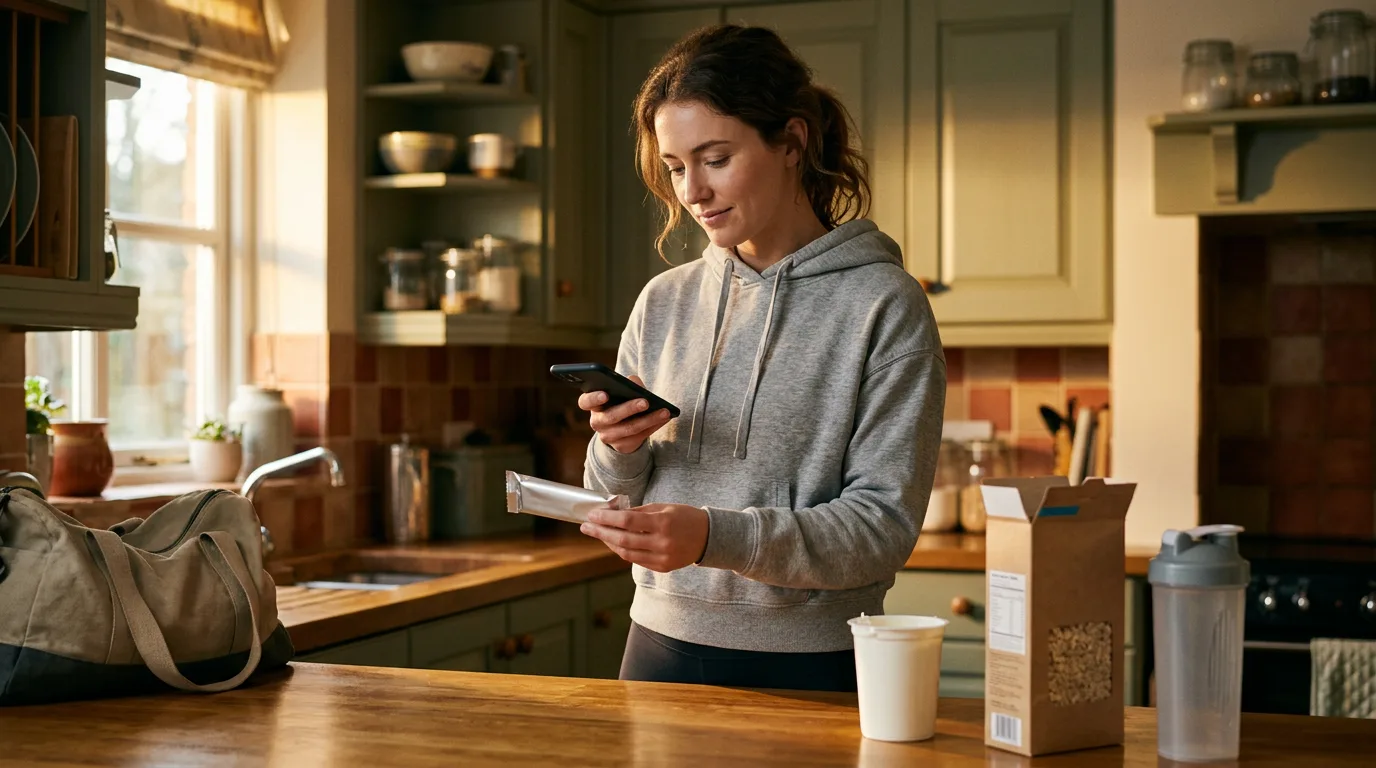
Your client’s food log says 1,450 calories. Somewhere in there is a protein bar logged as the first “protein bar” the search turned up, a yoghurt guessed at “1 serving”, and crisps that never got logged. The right numbers were printed on the pack the whole time.
A food barcode scanner logs a packaged food from the barcode on its pack: the client points the phone camera at it and the app fills in the serving, calories and macros, so they check the numbers instead of typing them. On Assistant Coach platform it’s built into the client app, beside the meal plan you wrote.
| Food barcode scanner at a glance | |
|---|---|
| What clients do | Tap the barcode button, point the camera at the pack, choose the amount |
| When there’s no match | They photograph the nutrition label, and the food fills in from it |
| What you see | The pack’s real numbers in your usual meal review, against your targets |
| What clients don’t need | A second tracking app, a paid subscription, or screenshots sent to you |
This guide covers:
- Why packaged food breaks fitness coaching clients’ food logs
- How the food barcode scanner works for personal training clients
- No barcode match? The nutrition label scanner fills it in
- What fitness coaches get: macros you can coach from
- Get your personal training clients scanning this week
Your client’s side, start to finish:
Why packaged food breaks fitness coaching clients’ food logs
Packaged food should be the easiest thing to log: by law, most UK and EU packs carry a nutrition declaration, and US packs a Nutrition Facts label.
Getting them into the log is the problem. In a study of 141 current and lapsed food journalers, people called logging “too much effort” and “tedious”, and complained that a food search returned “multiple postings with all different information”. So clients pick the closest-looking entry, round the serving, or skip the snack.
And the fix often costs your client extra: MyFitnessPal moved its barcode scanner behind its paid Premium subscription in October 2022. So clients type food in by hand, pay for a second app, or send you screenshots from a tracker you never see.
How the food barcode scanner works for personal training clients
- Scan. In Log a meal, the client taps the barcode button and points the camera at the pack.
- Check against the pack. On a product’s first scan, the client compares it with the nutrition table and corrects anything that differs.
- Choose the amount and add it to the meal.
Product details come from Open Food Facts, an open food database, and from foods other clients have added. Once a product is saved, the next scan by anyone goes straight to the amount.
No barcode match? The nutrition label scanner fills it in
Now and then a barcode won’t match. The client switches to Label and photographs the nutrition table, the food fills in for them to check, and the product is saved for the next person who scans it.
What fitness coaches get: macros you can coach from
A scanned food shows up like any other: in the meal, the day’s calories and macros, and against your targets.
The client checks against the pack, so you don’t have to. The person holding the wrapper confirms the numbers, and can fix a saved product later from Doesn’t match your pack? You read the day’s totals and trends instead of auditing entries.
Pair it with a plan that names the products your client buys (how to build one). Scanning doesn’t replace meal photos: home-cooked and restaurant meals still suit a photo, and clients who don’t count can keep logging without tracking.
Get your personal training clients scanning this week
On Assistant Coach platform, scanning sits inside client meal logging, alongside the meal plan builder, check-ins and the workout logger. One app for your client, one place for you to read it.
- Send the video. The clip above is in Resources, ready to send to a client’s app, so you never record instructions.
- Start with your packet-heavy clients. Whoever lives on protein shakes and meal deals gains the most this week.
- Point them at the help page. Scanning packaged food walks them through it, and the coach guide covers your side.
Frequently Asked Questions
Is there a personal training app with a food barcode scanner?
Yes. On Assistant Coach platform it’s built into the client app, next to your meal plan.
Do clients need MyFitnessPal Premium to scan food barcodes?
Not if their coaching app has a scanner. MyFitnessPal has kept it behind Premium since October 2022; Assistant Coach builds one into the client app.
What if a food barcode isn’t found?
The client switches to Label and photographs the nutrition table, then checks the numbers. The product is saved for the next scan.
How accurate is barcode scanning for tracking macros?
As accurate as the label, which is why the first client to scan a product checks it against the pack.
References
- Cordeiro, F. et al. (2015). Barriers and Negative Nudges: Exploring Challenges in Food Journaling.
- Droid Life (2022). MyFitnessPal Puts Barcode Scanner Behind Premium Paywall
- Food Standards Scotland. Nutrition declarations
- U.S. Food and Drug Administration. How to Understand and Use the Nutrition Facts Label
 Nutrition Coaching Without Calorie Counting: A Coach's Guide
 Nutrition Adherence for Personal Trainers: A Coach's Guide