
Which personal trainer apps let you send a client a voice note? In 2026, most of the big ones. That makes a yes-or-no list close to useless. The question that actually changes your coaching week is where the voice note goes once you press send.
Voice feedback in a coaching app is a recorded audio message from coach to client, sent and played inside the platform instead of on WhatsApp. It usually lands in a chat inbox, on a check-in reply or on a workout comment, and each suits a different kind of coaching. If you are still deciding whether voice beats text at all, start with when a voice note beats a written reply.
Here’s what this guide covers:
- Personal trainer apps with voice messaging, compared
- Where the voice goes in fitness coaching apps
- What fitness coaches should check before choosing
- Where Assistant Coach fits
- How to choose: a conversation or a recorded review of the week?
Personal trainer apps with voice messaging, compared
We checked each platform’s help centre, changelog and product pages in September 2026, and features change often. “Not stated” means we could not find it documented, not that it is definitely missing.
| Platform | Where the voice goes | Clients can send voice? | Length limit | How long it's kept | Transcription | Video |
|---|---|---|---|---|---|---|
| Assistant Coach | Check-in reply, with or instead of text and photos. No chat | No | 5 min | Stays with that week's reply, no time limit; coach and client can download | No | Not yet |
| Trainerize | Chat, 1:1 and groups | Yes | 5 min | Deleted after 6 months | In chat, mobile app only (3 min, 50 MB) | Not stated |
| TrueCoach | Messages, including groups* | 7 min | Not stated | Not stated | Not stated | Not stated |
| Everfit | Inbox (chat) | Yes, unless the coach turns it off | 5 min | Deleted after 30 days | Webcam video in inbox; on comments on form responses | Not stated |
| Kahunas | Chat | Not stated | 15 min | Not stated; recipient can download | Not stated | In chat (500 MB on web) |
| PT Distinction | Chat, and comments on completed client activity | Yes | Not stated | One-click, both ways | Not stated | Not stated |
| My PT Hub | Chat, and check-in feedback | Yes, in chat | Not stated | Not stated | Not stated | On check-in feedback |
| CoachRx | Client conversations and workout comments | Not stated | Not stated | Not stated | Loom in messages, notes and workout comments | Not stated |
| HubFit | Chat | Not stated | Not stated | Not stated | Loom link on check-in reviews | Not stated |
| 1FIT | No voice notes documented | Not stated | Not stated | Not stated | Video feedback on check-ins | Not stated |
*TrueCoach’s February 2026 launch announcement also lists workout feedback, check-ins, progress logs and habits, but its help centre documents messages, so confirm the rest in a trial.
For pricing, data export and the rest, see our Trainerize, Everfit and Kahunas comparisons and the PT Distinction alternative guide.
Where the voice goes in fitness coaching apps
In a chat inbox, a voice note is part of a conversation. That suits quick answers, mid-week nudges and clients who like to talk things through. The cost is findability. When you want to hear what you told a client in March, you are scrolling a thread, the same problem that makes WhatsApp voice notes disappear into the scroll.
On a check-in reply, the voice note is recorded while the client’s answers, numbers and photos are in front of you, and it stays attached to that week. That suits the weekly review: explaining a plan change, or encouragement after a bad week. The trade-off is that it isn’t a conversation. My PT Hub and Assistant Coach work this way, and HubFit and 1FIT do the same with video.
On a workout or activity comment, the note is pinned to one session. That suits technique cues and reacting to a new personal best. CoachRx does this in workout comments, and PT Distinction lets coaches comment by voice on completed client activity.
Decide what the voice note is for before you compare apps. If it’s for talking, you want chat with two-way voice. If it’s for reviewing the week, you want it attached to the check-in, where you and your client can find it again.
What fitness coaches should check before choosing
Length. Five minutes is the common cap. TrueCoach allows 7 and Kahunas 15. A minute or two covers most weeks, so the cap only matters if you record long technique breakdowns.
Whether clients can answer by voice. Two-way voice makes a conversation feel natural, and it also adds listening to your week. Twenty clients each sending a two-minute note a week is 40 minutes of audio before you reply to anyone. Everfit lets you switch client voice messages off if that becomes too much.
Transcription. PT Distinction added one-click transcription in November 2025, in both directions. It helps clients in a noisy gym, and helps you skim replies instead of playing each one.
Video. If you would rather show than tell, check where video lives: in chat, on check-ins, or through Loom, a separate screen-recording tool that CoachRx and HubFit rely on.
How long recordings are kept. Per their help centres, Trainerize deletes voice messages after six months and Everfit after 30 days. If a note explains why you changed a client’s plan, you may want it long after that. Download what matters, or choose an app that keeps it with the client’s record.
Where Assistant Coach fits
Assistant Coach, a newer platform we build, currently in public beta, is a full coaching workspace: structured check-ins, a workout logger with inline video review, meal and workout plan builders, goals, client notes and to-dos, a coach website with lead capture, and full data export. Voice sits inside the weekly check-in review. You read the client’s answers, photos and numbers, write your reply on the same screen, and press Voice next to Add photos to record up to five minutes. Send it with your text and photos, or on its own.
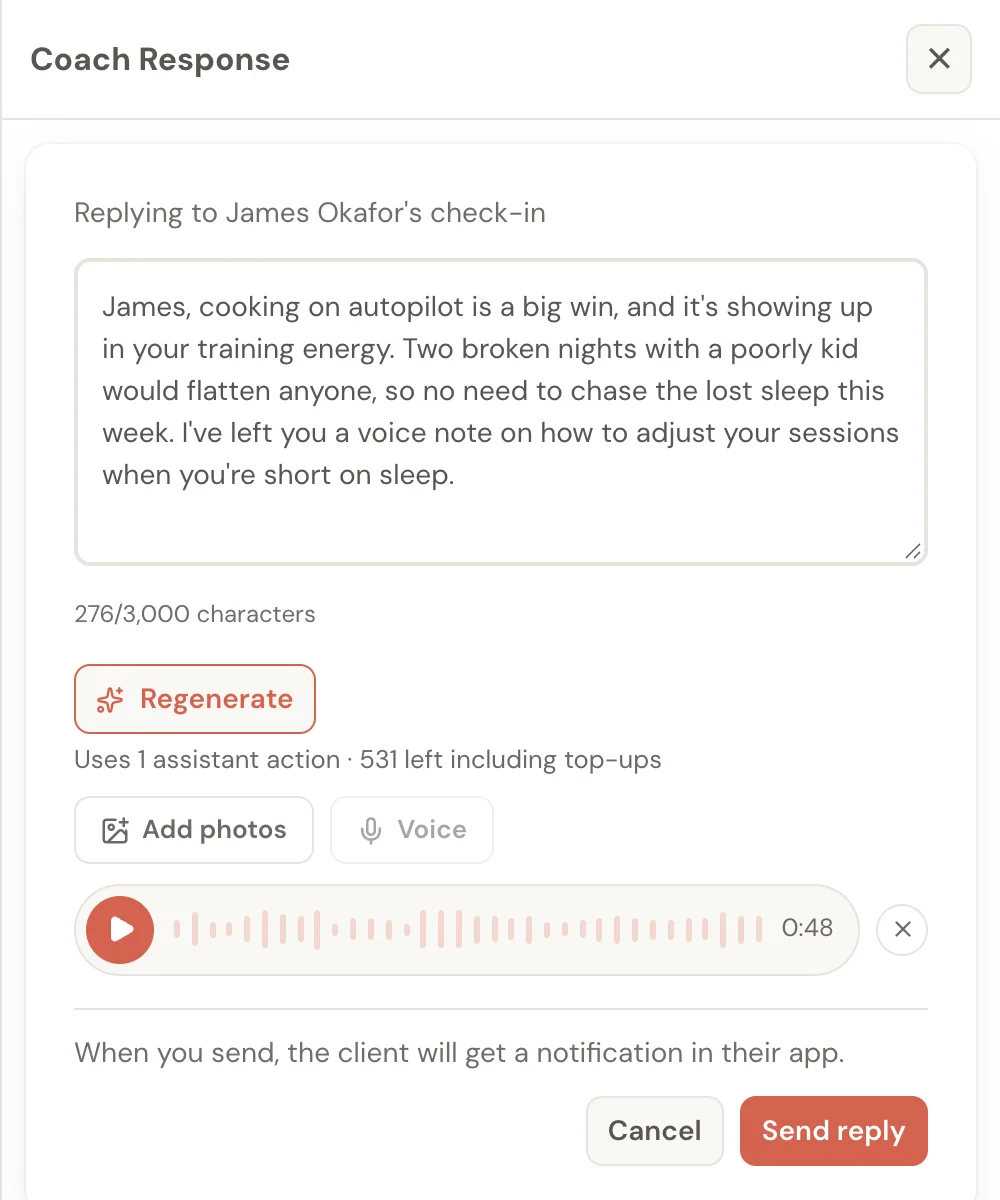
Your client gets a notification, plays the note under your written reply in their client app, and can download it. So can you. Recording one uses no assistant actions. The voice notes help page walks through recording, redoing and removing a note.
The voice note is part of the week’s record, not the chat scroll. It stays with that check-in reply with no time limit, until you remove it or delete the reply, so next month you can find what you said and why.
Here is what it doesn’t do yet. There is no chat inbox, clients can’t reply by voice, there’s no transcription, video isn’t available, and voice notes are on check-in replies only, not meal or workout comments.
How to choose: a conversation or a recorded review of the week?
- You coach through conversation. Quick questions, daily nudges, clients who like to talk. Pick a chat app with two-way voice: Trainerize, Everfit, PT Distinction or My PT Hub. Choose PT Distinction if transcription matters.
- You coach through the weekly review. Put voice on the check-in reply, next to the data it’s about: My PT Hub or Assistant Coach. For what to say in it, see how to respond to client check-ins.
- You coach technique. Look at voice on workout comments (CoachRx) or video feedback on check-ins (My PT Hub, 1FIT, HubFit via Loom).
If the weekly check-in is where your coaching happens, Assistant Coach keeps the voice note beside the answers, plans, workout logs and goals it refers to. If most of your coaching happens in conversation between check-ins, a chat app suits you better today.
Frequently Asked Questions
Which personal trainer apps have voice messaging?
As of September 2026, Trainerize, TrueCoach, Everfit, Kahunas, PT Distinction, My PT Hub, CoachRx and HubFit document voice notes, mostly in chat. My PT Hub also takes voice on check-in feedback, and CoachRx on workout comments. Assistant Coach puts a voice note of up to 5 minutes on the check-in reply. 1FIT documents video check-in feedback, but no voice notes.
Which coaching apps let you send voice notes on client check-ins?
My PT Hub lets coaches leave text, voice or video feedback on check-ins. Assistant Coach lets coaches record up to 5 minutes on the check-in reply, with or instead of text. Most other apps handle voice through chat instead.
How long does Trainerize keep voice messages?
Six months. Trainerize’s help centre says voice messages stay in the chat or group for six months, then are permanently deleted. Everfit deletes them after 30 days. If a note explains an important decision, download it or keep the key points in writing.
Can clients send voice notes back to their coach?
On several apps, yes. Trainerize, Everfit, PT Distinction and My PT Hub let clients send voice notes in chat, and Everfit lets the coach switch that off. On Assistant Coach, voice notes go one way: clients listen and can download, but can’t record a reply.
Which coaching apps support video feedback for clients?
Trainerize allows videos in chat from its mobile app, Everfit records webcam video in the inbox, and Kahunas records video in chat. My PT Hub and 1FIT offer video feedback on check-ins, and CoachRx and HubFit use Loom. Assistant Coach doesn’t offer video feedback yet.
Do any coaching apps transcribe voice notes?
PT Distinction added one-click transcription of chat voice notes in November 2025, working both ways. None of the other apps we checked documented transcription as of September 2026, and Assistant Coach doesn’t transcribe. If clients listen at the gym, put the key instruction in writing too.
References
Checked on 21 September 2026 on each vendor’s own site; search the page title there.
- Trainerize Help Center: “Voice Messages”; “How to Send and View Individual Messages”
- TrueCoach Help Center: “Voice Notes Messaging”; TrueCoach blog: “Introducing Voice Notes for Personal Trainers in TrueCoach” (February 2026)
- Everfit Help Center: “Voice Messages”; “Private Messaging”; “Comment on a Form’s individual response”
- Kahunas Help Center: “Chat Features”
- PT Distinction blog: “New Updates to Our Personal Trainer Software” (November 2025); “Introducing Activity Feed Comments” (October 2024)
- My PT Hub: “All Updates” (versions 2.2.0 and 2.4.0)
- CoachRx: Change Log; “How to Share Video Messages & Screen Share With Clients Using The Loom Integration”
- HubFit: Engagement and Coaching platform pages
- 1FIT: Platform page
- Assistant Coach Help: Voice Notes
 Why Fitness Coaching on WhatsApp Hits the 20-Client Wall
 TrueCoach vs Trainerize vs Assistant Coach (2026)